Node.js, Python and Ruby Application Hosting
Shared hosting has an unwritten boundary and application hosting is the wrong side of it. PHP sites are welcome; anything with a long-running process of its own is somebody else's problem, usually a VPS. So the customer who wanted to deploy a small Node.js API, or a Python worker, or the Ruby application a contractor left them with, ends up administering a server nobody asked them to run. You end up with one less service on your platform.
That boundary was a technical fact once. It is now mostly a habit. The same customer who runs a WordPress shop with you also runs a webhook receiver in Node, or a Python script that talks to their accountant's API, or a small Rails app somebody built for them three years ago and nobody has touched since. None of it is heavy. Most of it is hosted somewhere that is not you.
AdminBolt 1.8.0 added application hosting for Node.js, Python and Ruby. Your customers create an application from a wizard in their own panel; you decide which runtime versions exist on the server in the first place. Two things have to be true of the node before any of it works and they are the first thing to check, not the last.
The Short Answer
An application belongs to a domain. The customer picks a runtime, a version from the ones you installed, a folder inside their own space and the environment variables the process needs. The wizard can write a starter application that serves a page the moment it is created, so the first thing anybody sees is proof the setup works. Each panel action here has a client REST API equivalent.
| Who does it | Where | |
|---|---|---|
| Install runtime versions | You | Admin, Application Runtimes |
| Grant the feature | You | Hosting plan feature list |
| Create an application | The customer | Client panel, four-step wizard |
| Restart it, read its log | The customer | Client panel, per application |
| Deploy from CI | The customer | Client REST API |
Two things decide whether any of this works on a given node.
It has to be a CloudLinux server. Application hosting is a CloudLinux feature. On AlmaLinux it is not available, so a plan that promises it there is promising something the machine cannot do.
Apache or OpenLiteSpeed has to be serving. Under LiteSpeed Enterprise the application directives are inert, so an application would answer with a directory listing instead of starting. The panel says so on the page instead of letting somebody build what cannot start.
The Problem It Ends
The conversation is the same one every host has had. Somebody asks whether they can run a small Node service. The honest answer has been no, followed by a VPS recommendation, followed often enough by that customer moving the rest of their hosting to wherever the VPS ended up.
What makes it worse is that the need is usually tiny. A webhook endpoint that fires four times a day, or an internal tool with a handful of users, or a cron-driven script with a status page nobody looks at unless something breaks. Nothing about that justifies a server, the customer knows it and the recommendation lands as a brush-off, not as advice.
There is a cost on your side too and it is quieter. Customers who need one non-PHP thing tend to solve it themselves. They start a process from a cron job that nobody restarts after a reboot, or they run a script out of a home directory with its output going nowhere anybody can find it. You discover the arrangement during an incident. Giving them a supported way to do this is cheaper than that.
What You Get
- A boundary that moves without turning you into a VPS business. Small services live in the same account as the customer's sites, inside the support process you already have.
- Runtime versions under your control. Customers pick from the versions installed on the server or its default build, so nobody brings a runtime of their own.
- A first run that proves itself. The starter page serves as soon as it is created, so a working setup is visible before any customer code exists.
- Logs and restarts in the customer's hands. Between them they cover most of what such a support ticket would have asked for.
- Environment variables where they belong. Connection strings and keys go into the application's environment instead of a file in a folder the web server can reach.
- A deployment story. Every panel action has an API equivalent, so a pipeline can do the work unattended.
- An honest answer when it will not work. A runtime this server cannot serve is labelled that way in the wizard, before anybody builds against it.
How It Works From Where You Sit
Install the runtimes. The admin page sits under Settings and lists what the repositories offer against what this server has, one section per language. The header counts what the repositories hold against what is installed, so the gap is visible without scrolling. You can install a single version or take a whole language at once.
The documentation's advice is worth repeating: install what customers ask for and nothing more. Each version is one more package to keep current and a runtime nobody uses is pure maintenance.
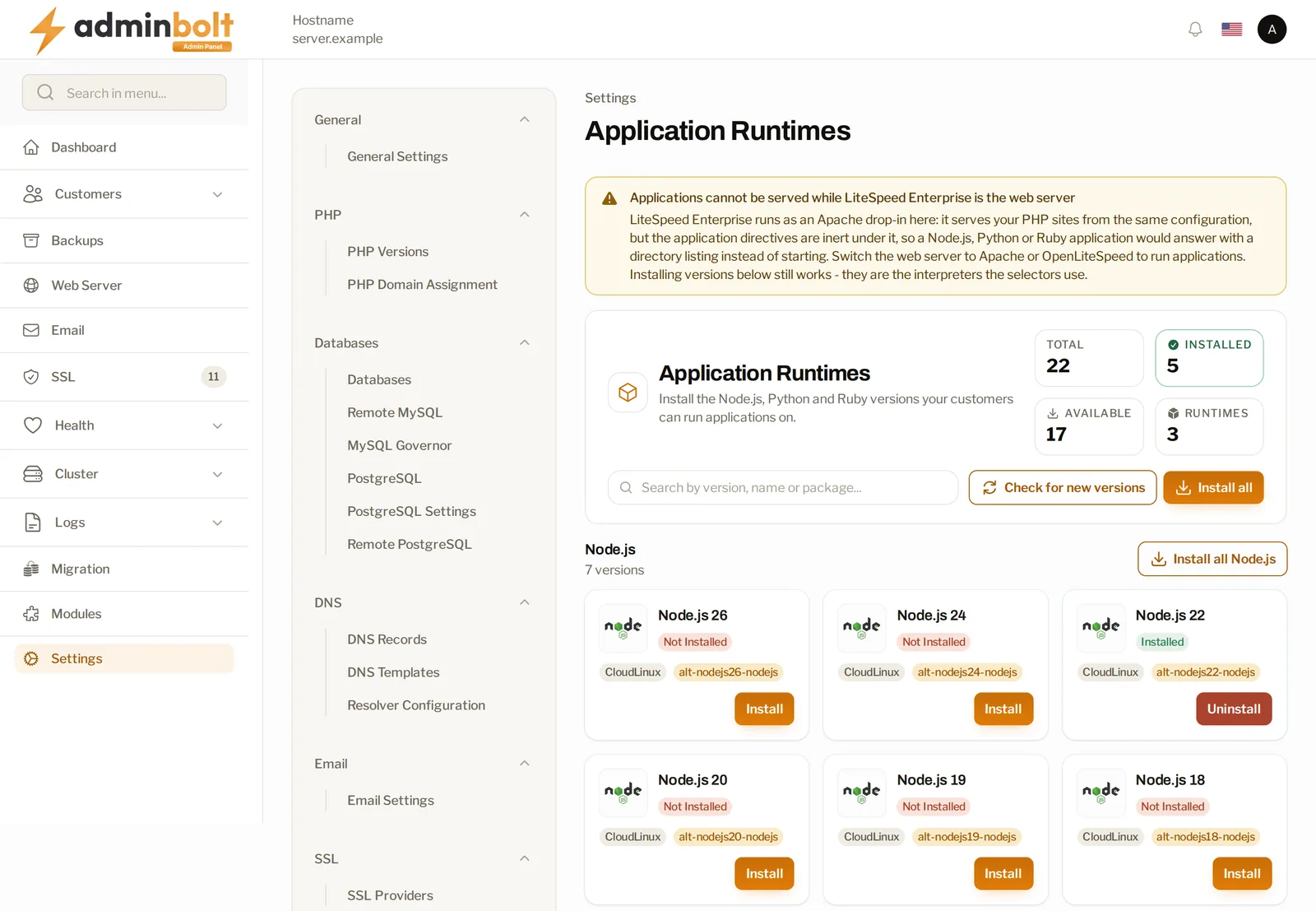
Check the application server and what is serving. The runtimes page reports both. It says plainly when the application server behind Node.js, Python and Ruby is missing, instead of listing versions and leaving you to work out why nothing starts. On Apache that application server is a module you install from Modules. And when LiteSpeed Enterprise is the web server it says that too, in the banner at the top of the screenshot above.
Installing runtime versions still works in that state. They are the interpreters the version selectors will offer, waiting for the day the web server changes.
Put the feature on the plans that should have it. Applications are a hosting plan feature. Since 1.8.1 the feature list follows the server, so Applications appears only where an application can actually be served and a plan cannot promise it on a node where nothing would start. A plan that already grants it keeps its setting.
What Your Customers See
Four steps, one application per domain. Each one asks a question the customer can answer without knowing anything about the server.
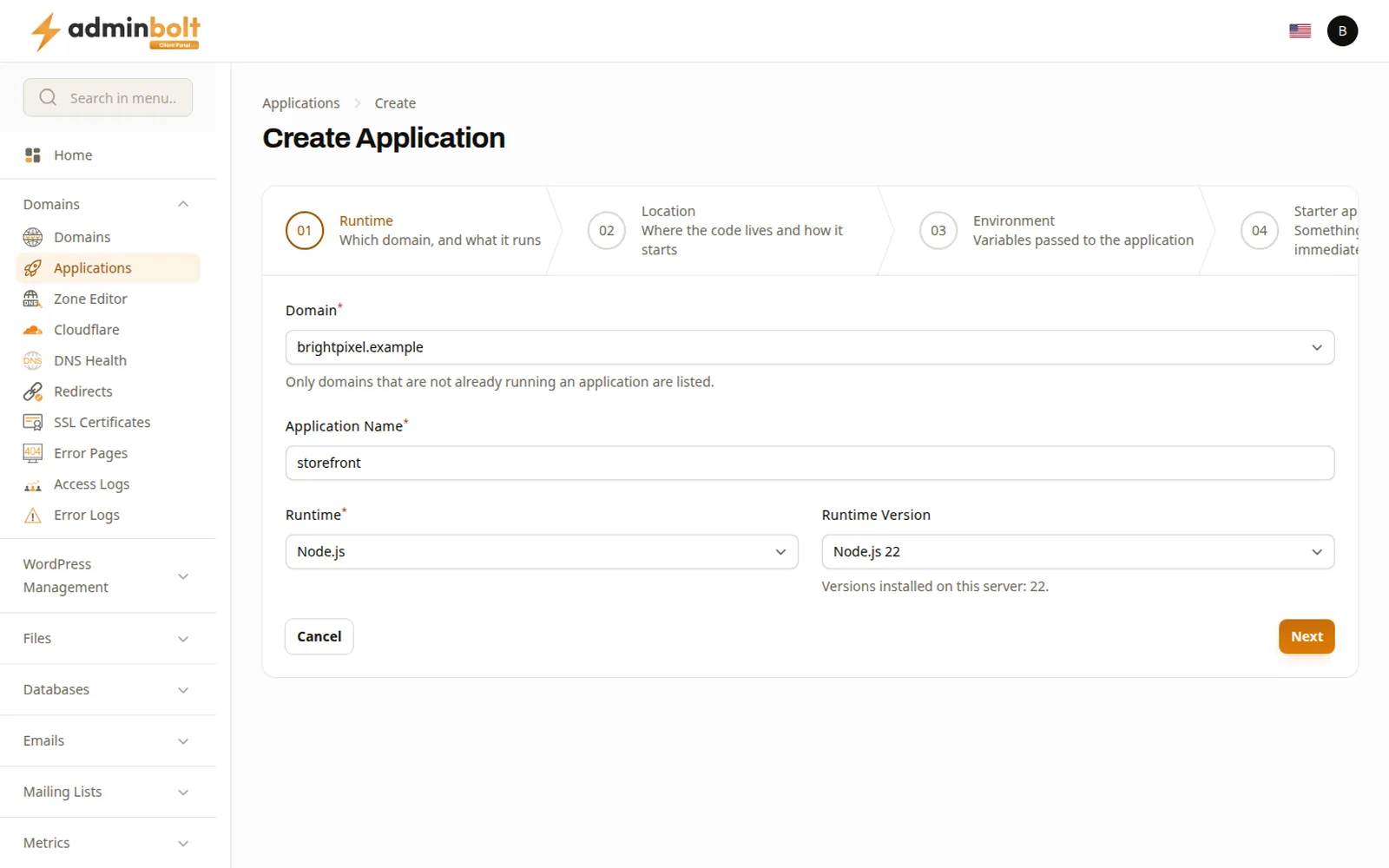
Runtime. They pick the domain, name the thing, then choose a language and a version from the ones you installed. Only domains that are not already running an application appear in the list and the field says so. A runtime this server cannot serve is marked as such here, before the customer builds anything against it.
Location. Where the code lives and how it starts. The application root is taken relative to the domain folder, so a customer who types apps/orders-api gets exactly that folder inside their own account; the panel shows the full path it resolves to, so there is no guessing. The startup file is relative to the application root and leaving it empty falls back to the runtime default. This step also carries a choice that is easy to miss and worth putting in your own onboarding: production or development. The step itself warns that development is for building only, so it is the wrong setting to leave behind.
Environment. Rows of variables, added one at a time. This is where a database connection string or an API key belongs, not in a file inside a servable folder.
Starter application. A minimal program that serves a page the moment it is created. The step names the files it will write, app.js and package.json for Node and it never overwrites a file that already exists.
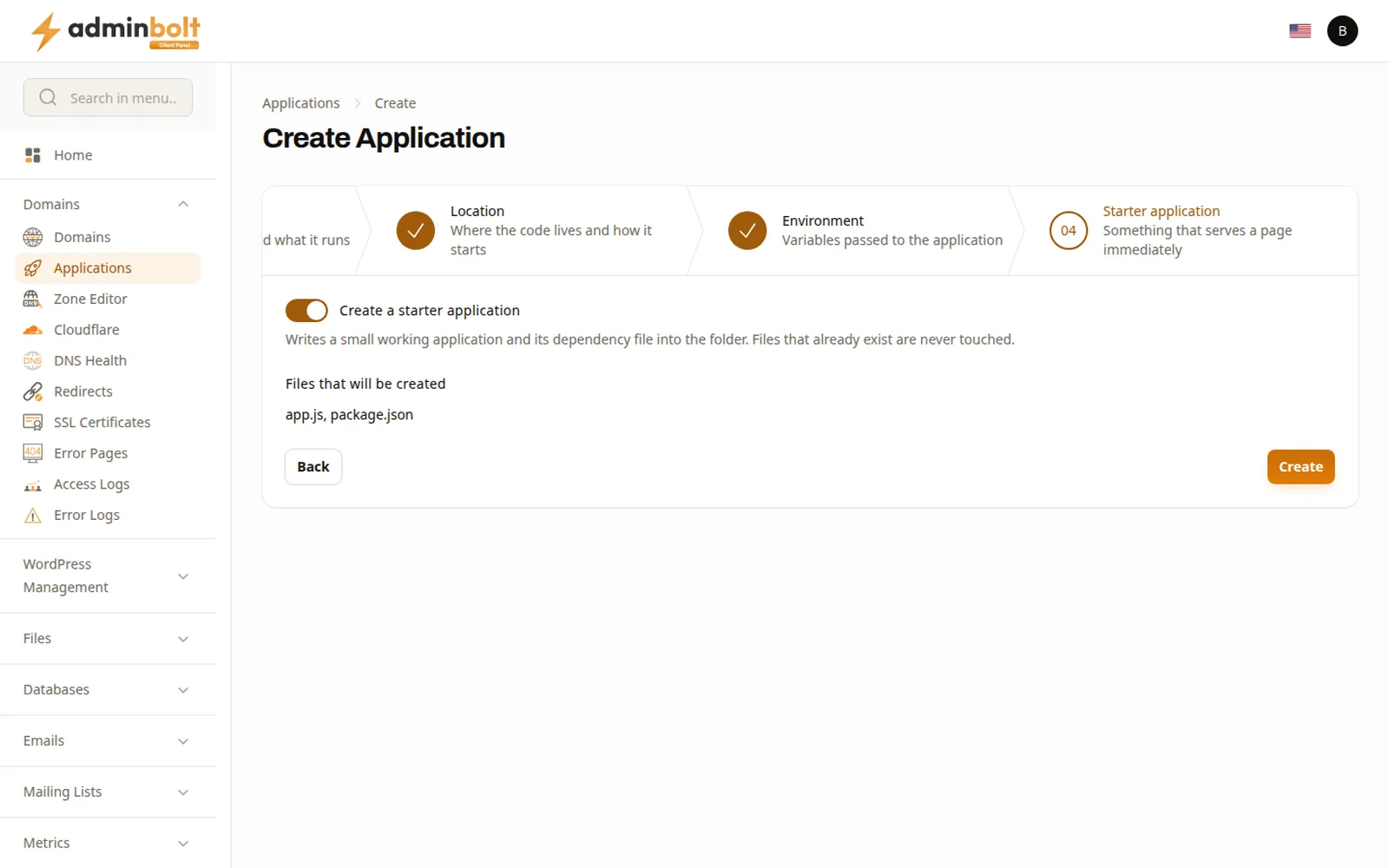
Keep the starter application for the first run. If its page loads, the domain, the runtime and the startup are all correct, so anything that breaks after the customer's own code lands is the customer's own code.
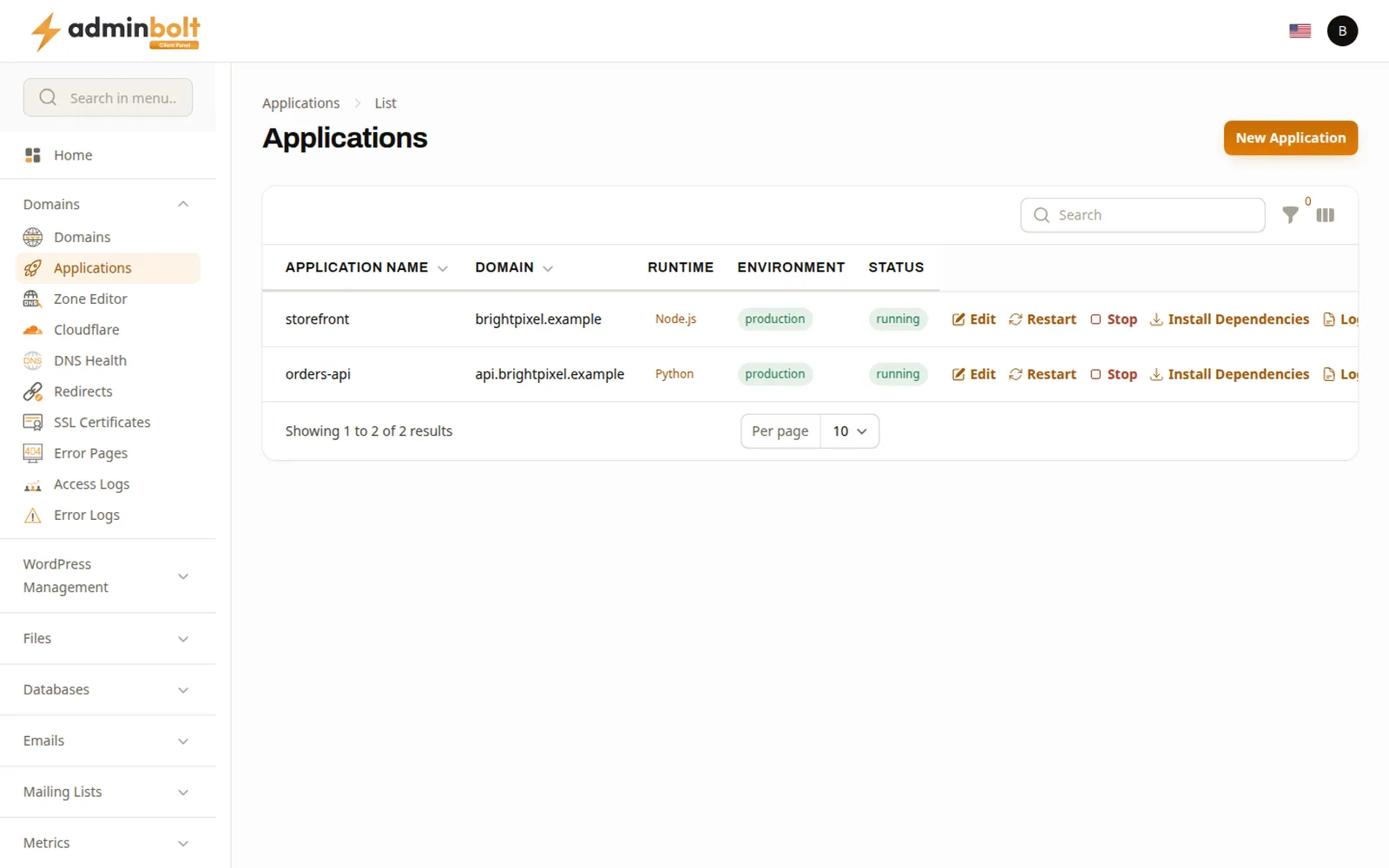
Afterwards each one appears in a list with its domain, its runtime, the environment it runs in and whether it is up. Beside each row sit the actions: edit, restart, stop, install dependencies, read the log, remove. A running process does not pick up a code change or a new environment variable on its own and saying that once in your own onboarding saves a ticket that otherwise arrives titled "my changes are not showing".
The API Is The Point For Some Customers
For a certain kind of developer, a panel is a thing to be avoided. What matters to them is that the client REST API covers the whole surface, from creating one to reading its log and restarting it.
That is what makes a deploy script possible without a browser session, which is the difference between a platform a developer tolerates and one they build against. If a meaningful share of your customers deploy from CI, lead with this part, not with the wizard. Our guide to panel API automation covers what else is reachable the same way.
Where It Fits Next To The Alternatives
Against a VPS. The VPS wins on control. It loses on everything else for a small service, because the customer becomes a sysadmin, patching becomes their job and your support boundary moves to "not our problem" at exactly the moment they need help. For a webhook receiver that is a poor trade. For a service with real scaling requirements the VPS is still the right answer and saying so keeps you honest.
Against a platform-as-a-service. Deployment platforms are good at this and they are also a separate bill, a separate account and a separate place to look when something breaks. Customers who already pay you for hosting frequently prefer one place and one invoice, particularly for the small things.
Against telling them to rewrite it in PHP. Occasionally reasonable. More often it is asking a customer to pay for work so that your platform does not have to change.
This is one piece of the wider question about what a modern panel should cover, which our cPanel alternative breakdown goes through in full.
Common Mistakes
-
Promising applications on a node that cannot run them. AlmaLinux cannot and neither can a server behind LiteSpeed Enterprise. Check both before the feature goes on a plan, not after a customer opens a ticket.
-
Installing every runtime version available. Each one is a package you now maintain. Install what is asked for and add more when somebody asks.
-
Leaving the starter application out of the first run. It is the cheapest diagnostic you will ever get and a customer whose starter page loads already knows the problem is their own code.
-
Not telling customers about restart. A running process reloads neither code nor environment variables on its own. One line in your own documentation prevents the ticket.
-
Leaving an application in development mode. Development is meant for building, so set production before the site goes live.
-
Letting configuration live in the code folder. Environment variables exist for the keys and connection strings. A file in a servable folder is a leak waiting for a misconfigured rule.
-
Opening a ticket before opening the log. Each application has its own Logs action and a failed start-up shows up there, so it is the first place to look.
FAQ
Which runtimes can customers use?
Node.js, Python and Ruby, in whichever versions you have installed, on a CloudLinux server. The wizard only offers versions that exist on the machine.
Do applications work on every web server?
No. On a CloudLinux server they run on Apache and on OpenLiteSpeed, not under LiteSpeed Enterprise.
How many applications can one domain run?
One. A domain that is already running an application is not offered again in the wizard, so customers with several services give each one its own domain or subdomain.
Where does the application's code live?
In a folder inside the customer's own account, given relative to the domain folder. The wizard shows the folder the path starts from.
How does a customer restart an application?
From the panel, per application, or over the API. A restart is needed after changing code or environment variables.
Can applications be deployed from a CI pipeline?
Yes. Every action the panel offers has an API equivalent, so a deploy script needs no browser session at all.
Does an application run inside the customer's hosting account?
Yes. Its code sits in a folder inside the account and its dependencies are installed as that account, so a small service lives next to the customer's sites and not on a separate machine.
Which version of AdminBolt has this?
Applications and the admin runtime page arrived in AdminBolt 1.8.0, with client REST API coverage from the start. 1.8.1 added the part where the hosting plan feature list only offers Applications on a server that can serve one.
Summary
Application hosting for these three runtimes is not a new idea in this industry and it is new for us. What it changes is who you have to turn away: the customer with one small service stops being somebody you refer elsewhere and the versions on offer stay something you decide instead of something that arrives inside a customer's tarball.
Your side of the setup is short. Confirm the node is CloudLinux running Apache or OpenLiteSpeed, install the runtimes your customers ask for, put the feature on the right plans. Their side is a four-step wizard that proves itself on the first run.
The 30-day trial at adminbolt.com runs on a real server with no card required and the details are in the applications documentation. The community forum is where hosts compare notes on what customers actually deploy.