OpenLiteSpeed in a Hosting Control Panel: Operator Guide
Most hosting businesses reach the same fork at some point. Apache does the job, but the servers work harder than the traffic justifies. LiteSpeed Enterprise is the polished upgrade, and it costs a licence per server. OpenLiteSpeed is the free edition of the same engine. It is fast, but on its own it means hand-written virtual hosts, a second configuration language and, for most hosts, giving up the panel their support team already knows.
That last part is what stopped most hosts from trying it, and it is the part a control panel removes. Since AdminBolt 1.6.0, OpenLiteSpeed is a third choice of web server next to Apache and LiteSpeed Enterprise. You install it, switch to it and manage it from the same screens as the rest of the server. Your clients keep the interface they know and there is no licence to buy.
This guide is for the person who has to decide: what you gain, what you give up, how the switch works on a live server and when the paid edition is still the right call.
The Short Answer
OpenLiteSpeed gives you the LiteSpeed engine and its page cache without a licence fee. Running it through a control panel means nobody writes a virtual host by hand, so the same panel screens keep working for you and for your clients. The compromise is .htaccess: OpenLiteSpeed reads it when the server starts, not on every request. The panel has a setting that bridges that for rewrite rules, and a paid edition for everyone who needs more.
| What you care about | Apache | OpenLiteSpeed | LiteSpeed Enterprise |
|---|---|---|---|
| Licence cost | None | None | Per server, per year |
| Page cache included | No, added separately | Yes, LSCache | Yes, LSCache |
.htaccess behaviour | Native, per request | On restart, or per request in the experimental mode | Native, per request |
| Switching | Baseline | One action from the panel, reversible | One action from the panel, reversible |
If your customers write their own rewrite rules all day, the paid edition earns its money. If they run WordPress, WooCommerce and a shop front that changes twice a month, OpenLiteSpeed usually gives you most of the performance for none of the licence.
What You Get
Switching a server to OpenLiteSpeed changes five things:
- A faster server under the same traffic. The LiteSpeed engine handles concurrent connections with an event-driven model instead of a process per request, so the same box serves more visitors before it starts queueing.
- A page cache your clients control themselves. LSCache is part of the server, not a plugin you install and then support. Account owners get a per-domain page with an on switch, cache lifetimes, a size limit, excluded paths such as
/wp-adminor/checkoutand a clear button for after they publish. - No licence line on the invoice. For a host running twenty servers, that is the entire difference between the paid and the free edition of the same engine.
- The panel you already run. Install, switch, tune, read the logs, migrate PHP engines: all of it from the admin panel.
- A reversible decision. The switch back to Apache is the same action in the other direction, so trying OpenLiteSpeed on one server is a low-risk experiment.
Your clients see no difference. Their domains, PHP settings, SSL certificates and file manager work exactly as before.
Without a panel, the cost of OpenLiteSpeed is not the setup but the upkeep. Every new site needs a virtual host written into the server configuration, every PHP version needs wiring to the right domains, and every rewrite rule a customer drops into a file needs somebody to restart the server. Past a few boxes, no two servers are configured quite the same any more, and every incident starts with finding out what this particular one does. There is a quieter cost too: a support team that has to read server configuration to answer a caching question is a support team that escalates caching questions.
How the Switch Works
The path from an Apache server to an OpenLiteSpeed server is four screens.
Install the module. OpenLiteSpeed arrives through the Module Manager, next to the other things you can add to a server. Installing it changes nothing about what serves traffic: Apache keeps answering requests until you decide otherwise, so you can install during business hours and switch during a quiet one.
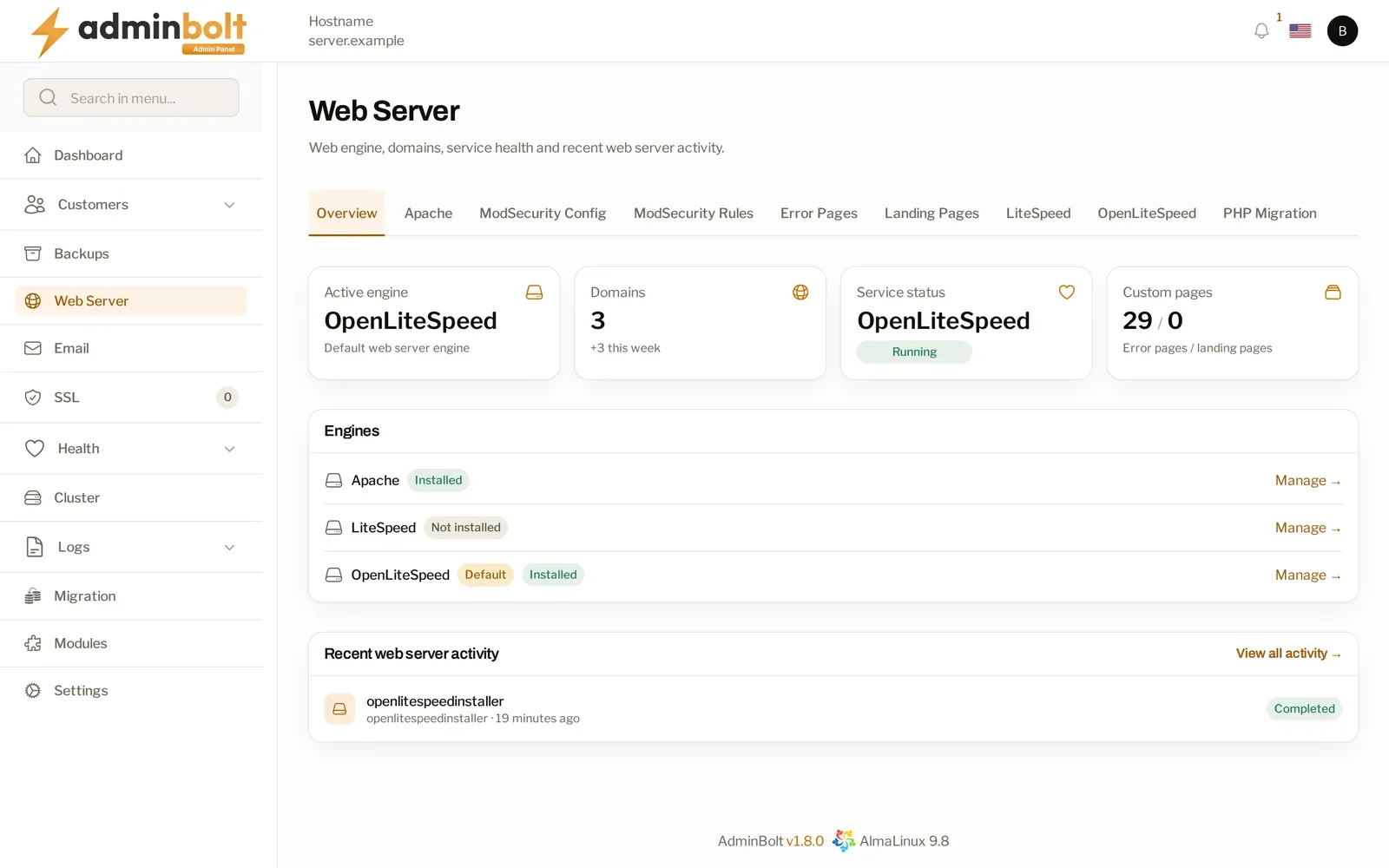
The Web Server overview shows the three engines side by side, each marked installed or not, with the active one named at the top. Check it before promising anything about a server.
Switch the active web server. The OpenLiteSpeed page has a single action. Confirm it and the panel stops Apache, generates the OpenLiteSpeed configuration for every domain on the server and starts the new service. Success is reported once OpenLiteSpeed is actually answering. If it cannot get there, the panel tells you why and puts the previous server back on the ports. That recovery is best effort, because Apache is stopped early in the process, so after a failed attempt confirm yourself that a web server is running. If some individual domains could not be taken across, the switch still completes and the notification says how many need a look.
After the switch the same page shows the state you now care about: the active web server, whether the service is running, the .htaccess mode and how many docroots the watcher covers. Watched docroots against total is the figure to glance at, because it tells you every site is covered.
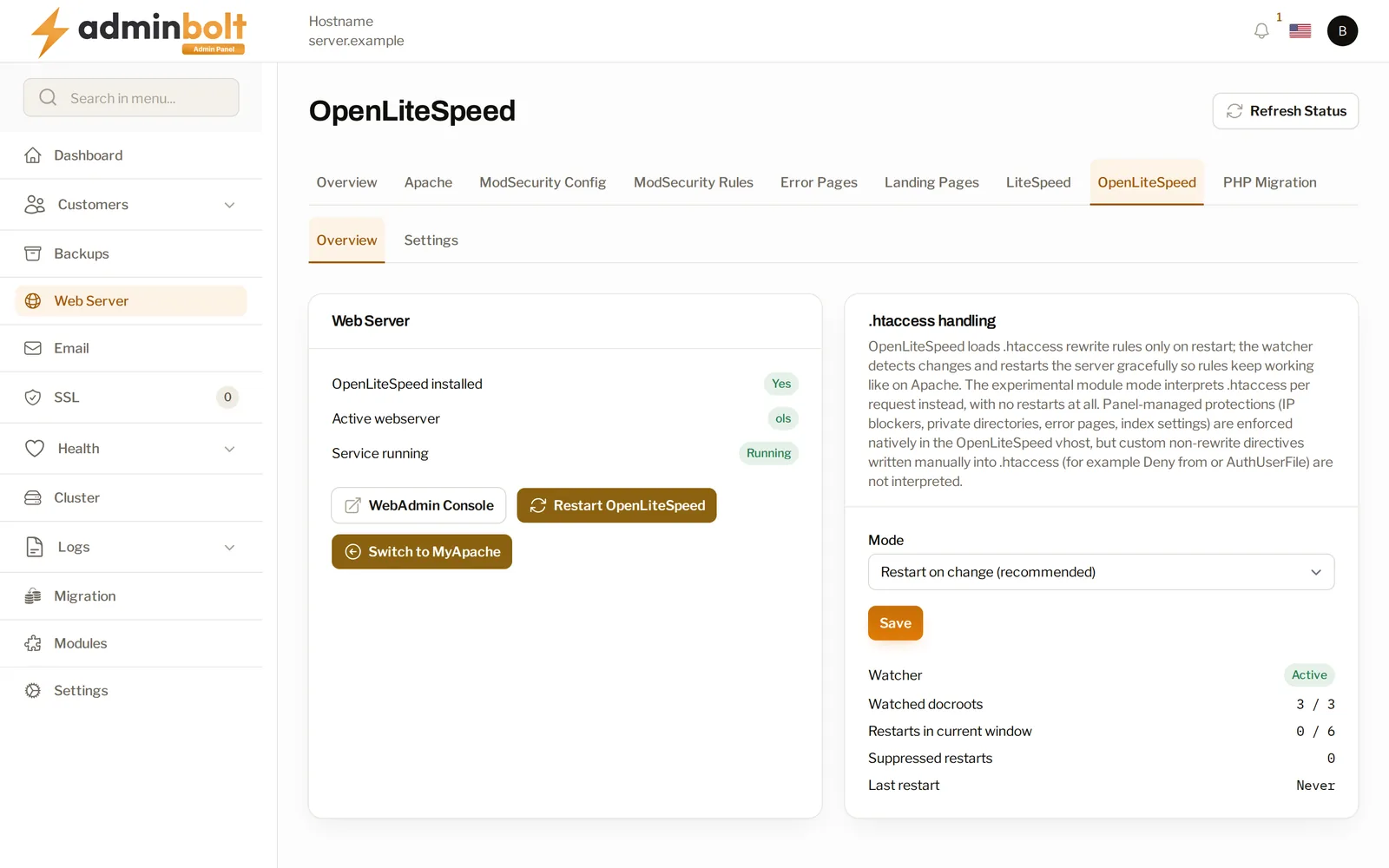
Choose how .htaccess is applied. This is the one decision OpenLiteSpeed asks of you that Apache never did. The next section covers it.
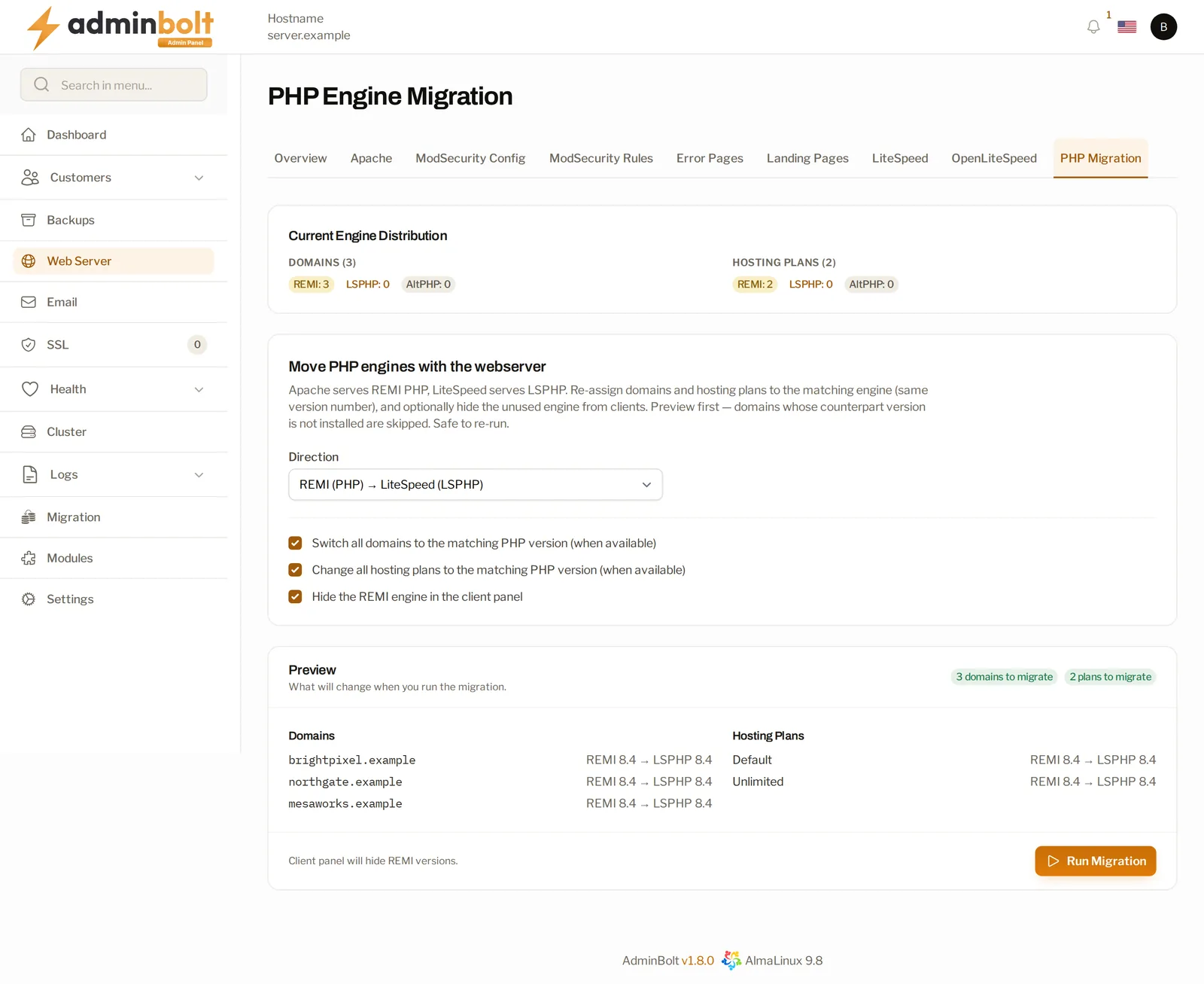
Move your PHP engines. OpenLiteSpeed serves PHP through LSPHP, the same engine the paid edition uses. The PHP Engine Migration page moves domains and hosting plans between the standard PHP builds and the LiteSpeed ones, in either direction.
The page previews before it does anything. You pick a direction and it lists every domain and plan it would move, with the version on each side of the arrow, and skips any domain whose counterpart version is not installed. The same page has to be run in reverse before a server goes back to Apache. If you forget, the panel refuses the switch and names the domains still on LSPHP.
After that, the OpenLiteSpeed screens behave like the rest of the panel. Server tuning covers connections, timeouts, request body size and compression. Error and access logs are tabs of the same Logs page every other service reports into. The server's own WebAdmin console is reachable from the dashboard, with its credentials, when you need it.
The .htaccess Question
This is the real difference between the free edition and the paid one.
LiteSpeed Enterprise reads .htaccess files the way Apache does, on every request. OpenLiteSpeed reads them when it starts. On a bare OpenLiteSpeed install, a customer who edits a rewrite rule sees nothing change until somebody restarts the server. On a shared box that is a support ticket at best and a silent breakage at worst.
The panel offers three modes:
| Mode | What happens | When to pick it |
|---|---|---|
| Restart on change | A changed .htaccess is noticed and the server restarts gracefully, so rules behave as they do on Apache | The default, right for almost everyone |
| Per-request module | Rules are interpreted on each request, with no restarts | Experimental, for estates where rewrite rules change constantly |
| Off | .htaccess files are not applied | Locked-down estates where only the panel writes rules |
Two things to know before you pick.
First, the protections the panel manages for an account (IP blocking, private directories, custom error pages, directory index behaviour) are written into the site configuration directly, in every mode. Turning .htaccess off does not turn off anything your customers configured through the panel.
Second, only rewrite rules are covered. Hand-written access directives of the older Apache kind, such as Deny from or AuthUserFile, are not interpreted in any mode. In the per-request mode, a site that uses such a directive drops back to restart-on-change on its own and appears in a list on the dashboard with the directive named. That fallback list is your cleanup queue: move each site to the panel's own IP blocking and directory privacy, then retry it from the same list.
LSCache and Your Support Load
The page cache is where most of the visible speed comes from. It is also the part your customers touch.
On a domain with caching enabled, the server keeps rendered pages and serves them without going back to PHP. For a WordPress site, that is the difference between a page assembled from a database on every visit and a page handed over as a file. The client LiteSpeed Cache page has the controls that matter: whether caching is on, a default TTL for pages that do not set their own lifetime, a maximum TTL that no page may exceed, the largest response worth caching, and excluded paths, which in practice means the admin area, the cart and the checkout.
Admins get the same controls for every domain on the server, plus the ability to purge one domain's cache without touching anyone else's.
"I published a change and I still see the old page" is one of the most common tickets in shared hosting. Here it becomes a button on a page the customer already has open. If you run WordPress at any scale, pair this with the panel's WordPress management, where the same accounts are installed, updated and signed into from one list.
Where It Fits Next to the Alternatives
Against Apache. You gain the engine and the built-in cache. You give up native per-request .htaccess, which the restart-on-change mode brings back for rewrite rules but not for older access directives. On a server full of standard CMS sites, that trade is nearly free. On a server full of hand-tuned legacy sites, read the fallback list before you commit.
Against LiteSpeed Enterprise. Same engine family, same cache. The paid edition handles .htaccess natively, so the question is whether that behaviour is worth a per-server licence to you. One hard constraint: both editions live in /usr/local/lsws, so a server runs one or the other. Moving between them means removing the first.
Against a reverse proxy in front of Apache. A proxy layer can get you similar numbers, at the cost of a second thing to configure, monitor and explain to whoever is on call. Choosing the web server itself keeps the stack one layer shallower.
There is also a resource argument that applies to the whole estate rather than to any one site. If you are working through that maths, we compared what different stacks consume in hosting panel resource usage. The broader panel decision is in our cPanel alternative breakdown.
Before You Switch
- Pick a quiet window. The switch affects every site on the server, not one account.
- Check what is on the box. LiteSpeed Enterprise has to go before OpenLiteSpeed can be installed.
- Look at your PHP assignments. On CloudLinux, a domain pinned to an Alt-PHP build has to move to a LiteSpeed or standard build first, because OpenLiteSpeed cannot serve Alt-PHP. The panel names the domains that are not ready instead of failing halfway. The rest of the CloudLinux picture is in our CloudLinux integration guide.
- Decide your
.htaccessmode before the switch, not after the first ticket. - Have a site list to check. Five sites you know well, opened right after the switch, tell you more than any dashboard.
Common Mistakes
-
Switching a production server before trying one that does not matter. The action is reversible, which tempts people to skip the rehearsal. Do it anyway, so you meet your estate's odd sites in a window you chose.
-
Leaving
.htaccesson Off because it sounds safer. Rewrite rules your customers rely on stop being applied and nothing announces it. Restart on change is the default for a reason. -
Ignoring the fallback list. Every site on it names the directive the panel could not handle. The list does not get shorter on its own.
-
Forgetting the PHP direction on the way back. Moving a server back to Apache while domains are still on the LiteSpeed PHP builds is refused, with the domains named. Read the message before retrying.
-
Assuming the cache is on. Installing the server does not enable caching for anybody. Caching is per domain and follows the hosting plan feature, so decide which plans include it before you tell customers it is there.
-
Leaving the WebAdmin console reachable from everywhere. The panel shows you its address and credentials because you occasionally need them. Keep the port reachable from trusted networks only.
-
Promising identical behaviour. Most sites will not notice the change. The ones that will are the ones with hand-written access rules, and you want to find them before the customer does.
FAQ
Is OpenLiteSpeed free for commercial hosting?
Yes. It is the open-source edition of the LiteSpeed server and carries no licence fee, per server or per account. You get the same engine family and the same page cache as the paid edition without the per-server cost.
Will my customers' sites break when I switch?
Most will not notice. The panel takes every domain across and reports success only once the new server is answering. If it cannot get there it puts the previous server back, on a best-effort basis, so check the service state yourself after a failed switch. The sites worth checking first are the ones with hand-written access rules in .htaccess.
Can I run OpenLiteSpeed and LiteSpeed Enterprise on the same server?
No. A server runs one of them. Remove LiteSpeed Enterprise before installing OpenLiteSpeed.
Do I have to configure virtual hosts by hand?
No. Sites, PHP assignments, SSL and the rest are managed on the same screens as on an Apache server. You never open the OpenLiteSpeed configuration.
What happens to .htaccess files my customers already have?
Rewrite rules keep working in the default mode, where a changed file is noticed and applied. Older access directives such as hand-written deny rules are not interpreted. Any site relying on one is listed for you with the directive named, so you can move it to the panel's own IP blocking and directory privacy.
Is LSCache the same as the WordPress cache plugin?
They work together. The cache lives in the web server; the plugin tells it when a page has changed. Your customers get the per-domain controls (on or off, lifetime, excluded paths, clear) on a panel page whether or not they run WordPress.
Can I go back to Apache?
Yes, with the same action in the other direction. Move your domains off the LiteSpeed PHP builds first. If you forget, the switch is refused and the remaining domains are named.
Which AdminBolt version has this?
OpenLiteSpeed became a supported web server in AdminBolt 1.6.0. The screens have grown since: server tuning, its own log tabs, per-domain caching for admins and account owners, and the PHP migration in both directions.
If you want to see it on your own hardware, adminbolt.com has a 30-day trial with no card required. The full setup path is in the OpenLiteSpeed documentation, and the community forum is where to ask somebody who has already done it.