PostgreSQL Hosting in a Control Panel: What Clients Get
Ask a shared hosting customer what stops them moving a project to you. Often enough the answer is one line in a framework config file. Their application wants PostgreSQL. Your platform offers MySQL or MariaDB. They go to a VPS, or to a managed database service, or to a competitor whose panel happens to have the box ticked.
cPanel and Plesk have carried PostgreSQL for years, so this was our gap and not the industry's. It mattered more each year, because the shape of what customers deploy has moved. A new Django or Rails project starts on SQLite, but the version that goes to production is very often on PostgreSQL and the same is true across much of the Node ecosystem and a growing pile of PHP projects. The person deploying them is the same person who used to want nothing more than a database name and a password.
AdminBolt 1.8.0 added PostgreSQL as an optional engine that runs beside MariaDB. This is what it gives your customers, what it asks of you and where the limits are.
The Short Answer
PostgreSQL is an optional module you install on the servers that need it. A plan feature then decides which accounts may use it.
| Question | Answer |
|---|---|
| Does it replace MariaDB? | No. Both engines run on the same server |
| Where do clients manage it? | Their existing Databases page, with the engine named per database |
| Is it reachable from the internet? | No by default. Accounts open named addresses; you decide whether they may go wider |
| Does it get backed up? | Yes, in the account's normal backups, with one restore exception covered in the FAQ |
| Does it count towards disk usage? | Yes, like the account's files |
The Problem It Ends
What PostgreSQL support fixes is the conversation where a customer describes what they want to deploy and you have to say no.
That conversation has a predictable shape. A developer has an application ready. It needs a database the platform does not have. You suggest the alternatives, which are all a step up in price or in work: a VPS they now administer, a hosted database service with its own bill, or a rewrite nobody is paying for. Sometimes they take one of those. More often they take the whole project somewhere that said yes.
There is a second, quieter version of the same loss. Agencies rarely have one stack. They have a MySQL site for one client, a PostgreSQL application for another. They consolidate their hosting where both fit. A platform that only does half of that is not competing for the consolidation, whatever its price is.
Adding an engine does not make you a database specialist and it is not meant to. It removes one reason for a customer to leave, on the servers where you choose to offer it.
How It Works From Where You Sit
Install the module. It arrives from the Module Manager, like the other optional pieces of a server and it is independent of which web server the node runs and of which PHP family sits on it.
Check the status page. Under Settings, Databases, the PostgreSQL page reports what the server itself says: whether the engine is installed, whether the service is up, where it accepts connections, whether the port is open, which release is running. When the panel cannot confirm a state it says so and does not report an all-clear. Once the module is installed, Health > PostgreSQL adds the service health and every database listed by size.
Beside that sits the driver table, a row for every PHP family and version on the server, each reading ready or missing. Straight after the install some rows read missing while the work is still finishing and a PHP version you add later picks the drivers up on its own, so the list converges without a second pass from you.
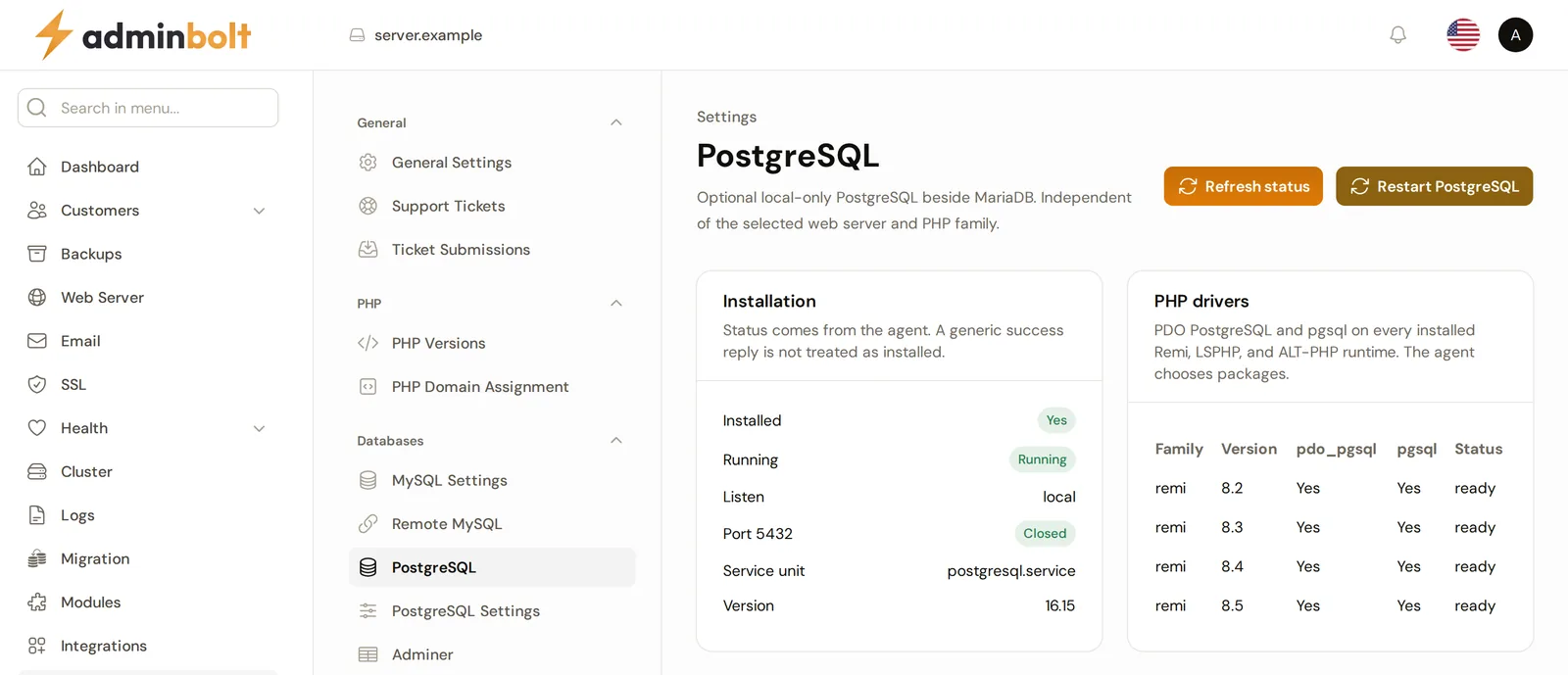
Put the feature on a plan. The hosting plan feature list carries a PostgreSQL Databases entry. Tick it on the feature lists of the plans that should have it.
Worth knowing before you tick it everywhere: the feature list offers PostgreSQL where its module is installed, but a feature already ticked stays listed after the module is removed. Check that the module is installed on each server where a plan offers it.
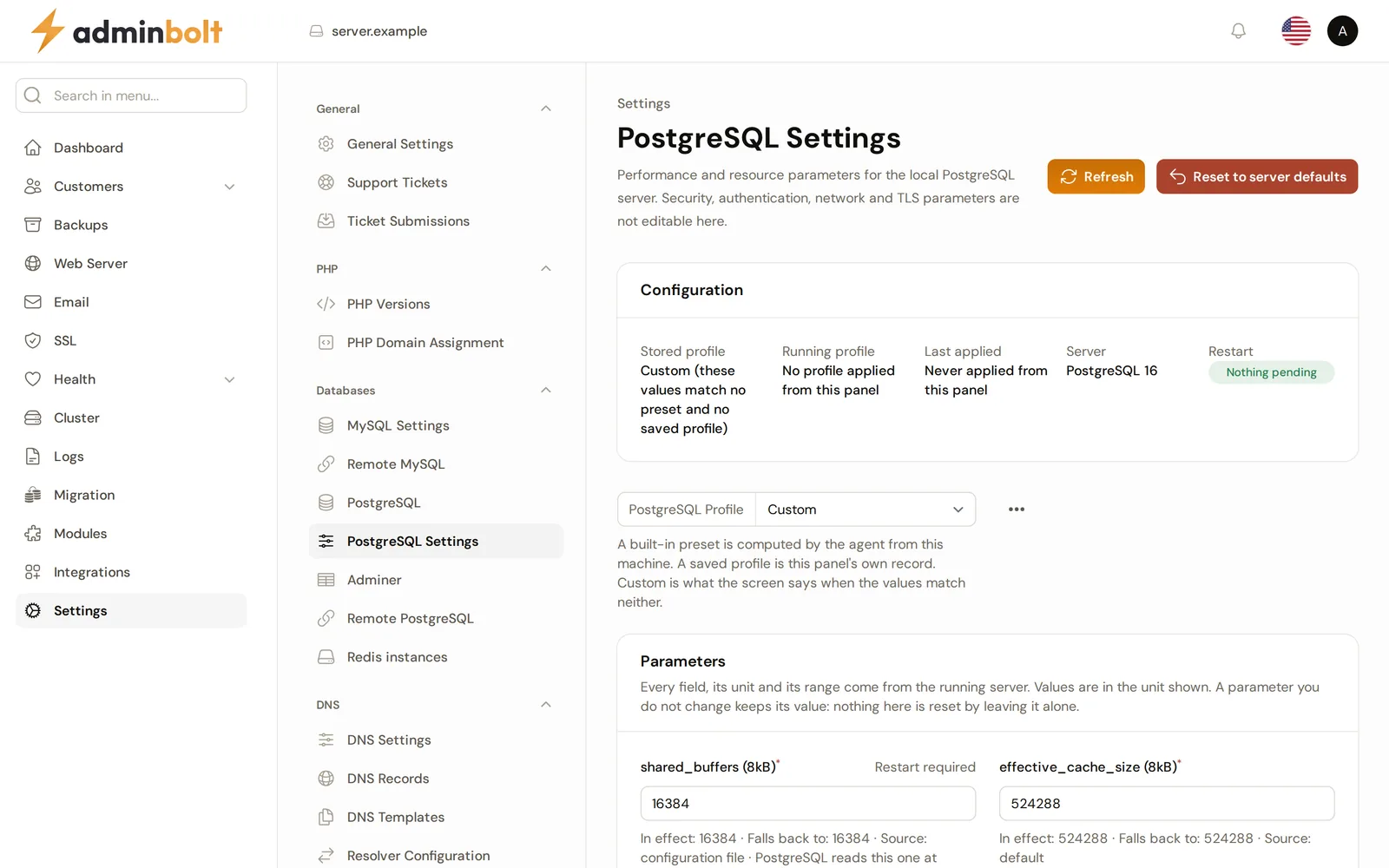
Tune it if you need to. The settings page opens with profiles instead of a wall of parameters. Balanced is the general-purpose starting point, Web transactions is for many short queries, which is what most hosted sites produce. Reporting is for fewer heavy ones. Custom is what the page says when the values match none of them. A preset is computed for the machine it is running on, so the same one lands on different numbers on a different server. Parameters marked Restart required take effect only after PostgreSQL restarts. A restart interrupts every open connection, so plan those changes for a quiet moment.
Above the profiles the page states where the current values came from, including a Last applied line that reads "Never applied from this panel" when the values on the server were not set here. That is the question that matters on a server somebody has touched by hand.
What the parameter list holds is worth noticing for what is absent from it. Shared buffers, work memory, WAL sizing, autovacuum and the parallel worker counts are all there, each with the unit and the range the running server accepts, each stating what is in effect and where that value came from. Authentication, listening addresses and TLS are not on the list at all. The settings you would tune for performance are exposed; the ones where a mistake becomes an incident are not.
What Your Customers See
On the customer's Databases page the engine is a column, not a section: a customer running a WordPress site on MariaDB and a Django application on PostgreSQL sees both databases in one list, each labelled with its engine. Adminer opens on a PostgreSQL database as one of the account's own roles; phpMyAdmin stays MariaDB-only.
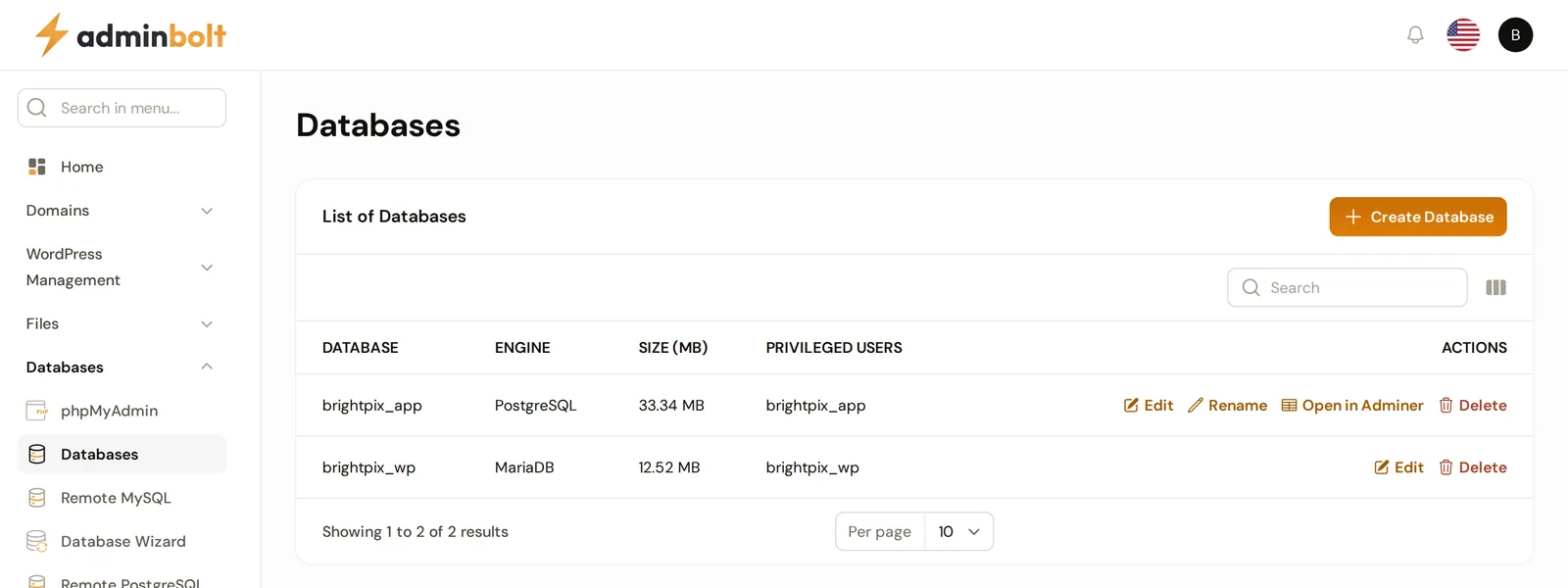
The account's own roles get full access to each of its databases, including objects created later, such as the tables an application creates when it migrates on deployment.
Customers manage these databases over the client REST API as well, which is where it belongs for anyone deploying from a pipeline. On your side, the administrator REST API reads, applies and resets the engine's settings with the same checks as the settings page. If automation is what your customers buy, our guide to panel API automation covers the wider surface.
Remote Access and Why It Is Off
By default PostgreSQL accepts local connections and its port stays closed. That is the right default for shared hosting: most applications live on the same server as their database. An open database port is one of the most reliably attacked things on the internet.
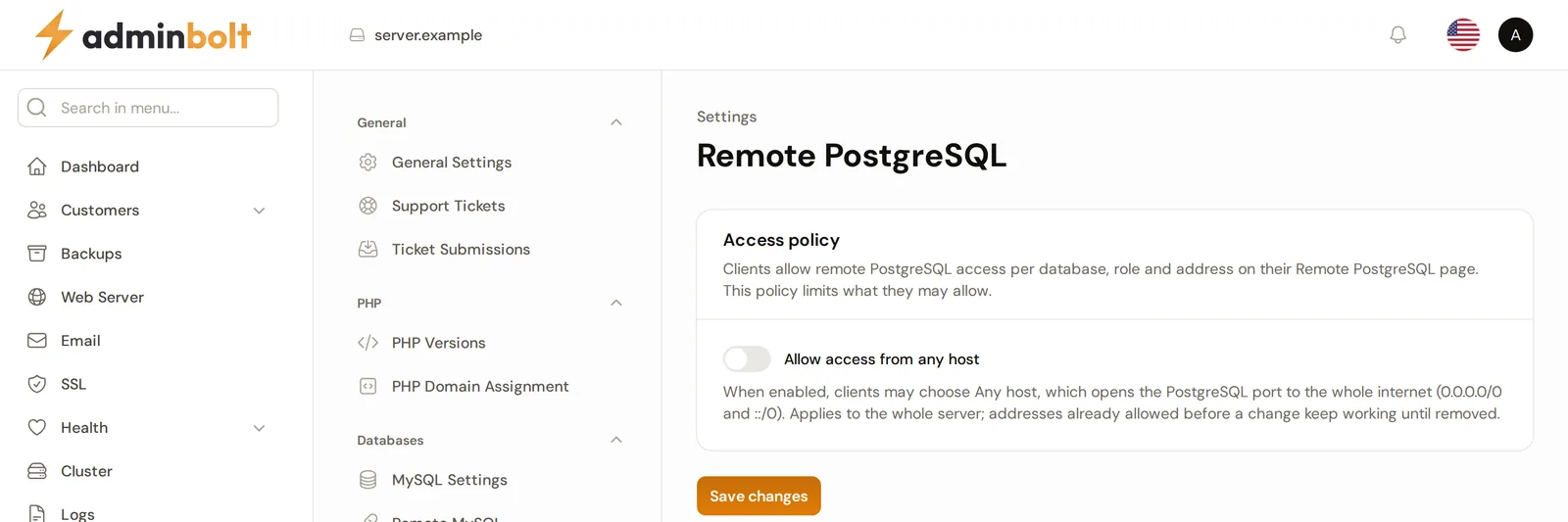
When a customer needs to reach their database from elsewhere and their plan carries the Remote PostgreSQL feature, they allow specific addresses per database and role. Above that sits a server-wide policy you control: whether accounts may choose to allow any host at all. While it is off, accounts can allow named addresses and ranges but nothing wider.
Two details worth having in your head before somebody asks:
- The policy is not retroactive. Addresses allowed while it was on keep working until they are removed, so switching it off protects future decisions without undoing past ones.
- Allowing any host means the role password becomes the only thing between a customer's data and the internet. There are legitimate reasons to permit it. There is no legitimate reason to permit it by default.
Where It Fits Next To The Alternatives
Against a managed database service. A hosted database is somebody else's problem to run, which is worth real money at scale. It is also a second bill, a second console and a network hop. For a customer whose application and database sit on the same shared account, the panel-managed engine is simpler and cheaper. For a customer with serious availability requirements, it is not competing.
Against telling the customer to take a VPS. This is the honest comparison, because it is what most hosts do today. The VPS is more capable and it moves the entire administration burden to a customer who did not want it. Some customers want that. Most asked for a database, not a server.
Against MariaDB for the same workload. The customer already knows which engine their application needs. The value of offering both is that you stop being the reason they have to choose.
If you are working through what a shared platform should offer in 2026 more broadly, our buyer's guide to hosting control panels has the wider checklist. What a panel needs for shared hosting covers the neighbouring decisions.
Common Mistakes
-
Installing it on every server by reflex. It is optional per node for a reason. Put it where you have demand or where you are selling into it, not everywhere because it is available.
-
Tuning parameters before measuring anything. Start with the profile that matches the workload and measure before changing individual settings.
FAQ
Are PostgreSQL databases included in backups?
Yes, under the same policy as the rest of the account. A whole-account restore does not recreate PostgreSQL databases or users automatically: its report names them and you recreate them before restoring the dump.
Can I bring PostgreSQL databases over from a cPanel backup?
Not through Backup file import, which leaves PostgreSQL databases out. Move those databases to the new account by hand.
Which version of AdminBolt has this?
PostgreSQL arrived in AdminBolt 1.8.0, together with client-side database and role management, client-managed remote access and coverage in the client REST API. Its Health page followed in 1.9.3 and the settings over the administrator REST API in 1.9.5.
Summary
PostgreSQL in a hosting control panel is an optional engine you install on the servers where it earns its place, plus one more line in a customer's existing Databases page. The defaults are the conservative ones and the wider exposure is your call.
What it changes is the conversation at the start. The developer with a PostgreSQL application stops being somebody you refer elsewhere.
You can try the whole thing on a real server with the 30-day trial at adminbolt.com, no card required. The setup detail is in the PostgreSQL documentation. The community forum is where to ask the operators who have already put it in front of customers.